
1. What It Is
Amorfs Data for Figma is a plugin that helps designers embed structured data directly into their image files, eliminating scanning errors and AI hallucinations from automated image processing.
Most image files, like receipts or invitations, rely on OCR and automated scanning to read the content inside them. This plugin skips that entirely by embedding your data directly into the file structure, giving you full control over how your designs are interpreted. The result is faster, more accurate processing without any coding knowledge required.
1. What It Is
Amorfs Data for Figma is a plugin that helps designers embed structured data directly into their image files, eliminating scanning errors and AI hallucinations from automated image processing.
Most image files, like receipts or invitations, rely on OCR and automated scanning to read the content inside them. This plugin skips that entirely by embedding your data directly into the file structure, giving you full control over how your designs are interpreted. The result is faster, more accurate processing without any coding knowledge required.
1. What It Is
Amorfs Data for Figma is a plugin that helps designers embed structured data directly into their image files, eliminating scanning errors and AI hallucinations from automated image processing.
Most image files, like receipts or invitations, rely on OCR and automated scanning to read the content inside them. This plugin skips that entirely by embedding your data directly into the file structure, giving you full control over how your designs are interpreted. The result is faster, more accurate processing without any coding knowledge required.
2. The Problem
You've spent hours getting every detail right. The typography is clean, the layout is tight, and the structured information is perfectly placed. Then the file gets exported, passed along, and a system tries to read it and gets it completely wrong.
This happens more than it should with receipts, business cards, and ID cards. As a designer, you're left with no visibility over what happens next:
You can't predict how AI or automated scanners will interpret your text elements
You can't include hidden context like URLs or implied relationships directly in a standard image file
There is no way to store structured data inside the image itself
The information was right there. It just had no reliable way to travel with the file.
2. The Problem
You've spent hours getting every detail right. The typography is clean, the layout is tight, and the structured information is perfectly placed. Then the file gets exported, passed along, and a system tries to read it and gets it completely wrong.
This happens more than it should with receipts, business cards, and ID cards. As a designer, you're left with no visibility over what happens next:
You can't predict how AI or automated scanners will interpret your text elements
You can't include hidden context like URLs or implied relationships directly in a standard image file
There is no way to store structured data inside the image itself
The information was right there. It just had no reliable way to travel with the file.
2. The Problem
You've spent hours getting every detail right. The typography is clean, the layout is tight, and the structured information is perfectly placed. Then the file gets exported, passed along, and a system tries to read it and gets it completely wrong.
This happens more than it should with receipts, business cards, and ID cards. As a designer, you're left with no visibility over what happens next:
You can't predict how AI or automated scanners will interpret your text elements
You can't include hidden context like URLs or implied relationships directly in a standard image file
There is no way to store structured data inside the image itself
The information was right there. It just had no reliable way to travel with the file.
3. The Solution
Amorfs Data for Figma changes that. Instead of leaving interpretation up to chance, the plugin lets you define exactly what your data is and embed it directly into the image before it ever leaves your hands.
Here is what that looks like in practice:
A structured, machine-readable format: The plugin packages your design into an .amf file that explains your data clearly to any system reading it, so your text elements are interpreted correctly every time
Hidden context is now visible: URLs, metadata, and implied relationships can be stored inside the exported file, nothing gets lost in translation
No extra steps: The plugin automatically analyzes your components and produces an export that is ready for processing
You stay in Figma. You stay in control. We've put together all the essential resources you need right here:
Install Amorfs Data for Figma — Download and install the plugin locally to get started right away
Read More: Amorfs Data for Figma - A Detailed Guideline — A how-to use the plugin and navigate any edge cases
3. The Solution
Amorfs Data for Figma changes that. Instead of leaving interpretation up to chance, the plugin lets you define exactly what your data is and embed it directly into the image before it ever leaves your hands.
Here is what that looks like in practice:
A structured, machine-readable format: The plugin packages your design into an .amf file that explains your data clearly to any system reading it, so your text elements are interpreted correctly every time
Hidden context is now visible: URLs, metadata, and implied relationships can be stored inside the exported file, nothing gets lost in translation
No extra steps: The plugin automatically analyzes your components and produces an export that is ready for processing
You stay in Figma. You stay in control. We've put together all the essential resources you need right here:
Install Amorfs Data for Figma — Download and install the plugin locally to get started right away
Read More: Amorfs Data for Figma - A Detailed Guideline — A how-to use the plugin and navigate any edge cases
3. The Solution
Amorfs Data for Figma changes that. Instead of leaving interpretation up to chance, the plugin lets you define exactly what your data is and embed it directly into the image before it ever leaves your hands.
Here is what that looks like in practice:
A structured, machine-readable format: The plugin packages your design into an .amf file that explains your data clearly to any system reading it, so your text elements are interpreted correctly every time
Hidden context is now visible: URLs, metadata, and implied relationships can be stored inside the exported file, nothing gets lost in translation
No extra steps: The plugin automatically analyzes your components and produces an export that is ready for processing
You stay in Figma. You stay in control. We've put together all the essential resources you need right here:
Install Amorfs Data for Figma — Download and install the plugin locally to get started right away
Read More: Amorfs Data for Figma - A Detailed Guideline — A how-to use the plugin and navigate any edge cases
4. See It In Action
Sometimes the best way to understand a tool is to just watch it work. Below are three short walkthroughs showing the full flow from your Figma canvas to the final export.
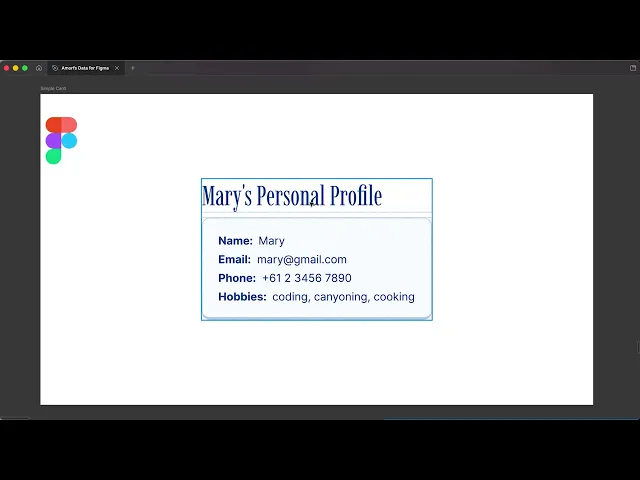
1. Simple Cards (Example 1):
How to package basic text elements along with their styling and colors, so the system captures both your content and visual attributes correctly.
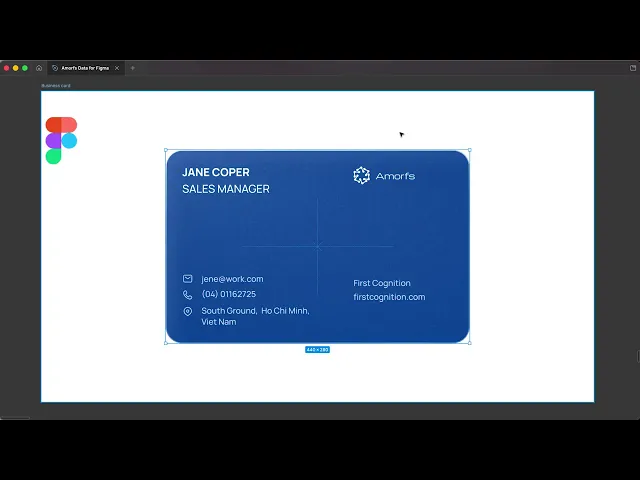
2. Business Cards (Example 2):
How to embed personal details and hidden URLs so automated scanners never miss a beat.
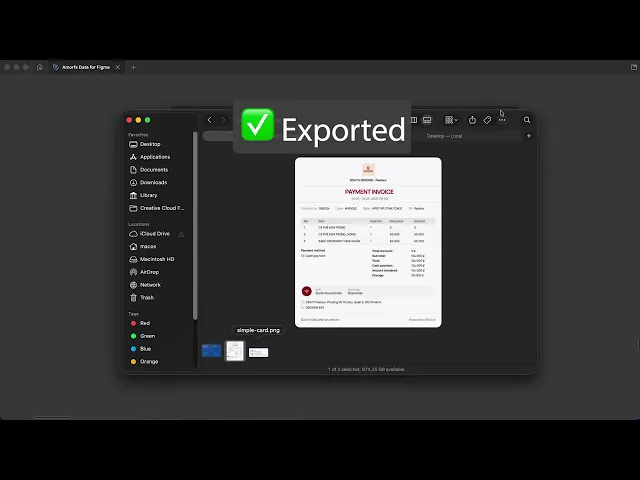
3. Digital Receipts (Example 3):
How to define exact data fields like totals and table grids to prevent misinterpretation when the file is read.
4. See It In Action
Sometimes the best way to understand a tool is to just watch it work. Below are three short walkthroughs showing the full flow from your Figma canvas to the final export.
1. Simple Cards (Example 1):
How to package basic text elements along with their styling and colors, so the system captures both your content and visual attributes correctly.
2. Business Cards (Example 2):
How to embed personal details and hidden URLs so automated scanners never miss a beat.
3. Digital Receipts (Example 3):
How to define exact data fields like totals and table grids to prevent misinterpretation when the file is read.
4. See It In Action
Sometimes the best way to understand a tool is to just watch it work. Below are three short walkthroughs showing the full flow from your Figma canvas to the final export.
1. Simple Cards (Example 1):
How to package basic text elements along with their styling and colors, so the system captures both your content and visual attributes correctly.
2. Business Cards (Example 2):
How to embed personal details and hidden URLs so automated scanners never miss a beat.
3. Digital Receipts (Example 3):
How to define exact data fields like totals and table grids to prevent misinterpretation when the file is read.
5. Wrapping Up
Designing shouldn't end at the visual layer. Amorfs Data for Figma is built to bridge the gap between your designs and how they get read and used downstream.
By embedding your data directly into your files, your structure, text, and hidden context are never lost. We hope this gives you a clear picture of what the plugin can do for your workflow.
Ready to get started? 👉 Install Amorfs Data for Figma
Still have questions? 👉 Read More: Amorfs Data for Figma - A Detailed Guideline
5. Wrapping Up
Designing shouldn't end at the visual layer. Amorfs Data for Figma is built to bridge the gap between your designs and how they get read and used downstream.
By embedding your data directly into your files, your structure, text, and hidden context are never lost. We hope this gives you a clear picture of what the plugin can do for your workflow.
Ready to get started? 👉 Install Amorfs Data for Figma
Still have questions? 👉 Read More: Amorfs Data for Figma - A Detailed Guideline
5. Wrapping Up
Designing shouldn't end at the visual layer. Amorfs Data for Figma is built to bridge the gap between your designs and how they get read and used downstream.
By embedding your data directly into your files, your structure, text, and hidden context are never lost. We hope this gives you a clear picture of what the plugin can do for your workflow.
Ready to get started? 👉 Install Amorfs Data for Figma
Still have questions? 👉 Read More: Amorfs Data for Figma - A Detailed Guideline
TABLE OF CONTENT
TABLE OF CONTENTS




" height="47.8243px" id="Fi98aqQOS" width="48.001px"/><path d="M 20.148 22.45 L 21.494 15.115 L 13.655 15.115 L 13.655 12.521 C 13.655 8.646 15.176 7.155 19.111 7.155 C 20.333 7.155 21.317 7.185 21.883 7.244 L 21.883 0.596 C 20.81 0.298 18.186 0 16.666 0 C 8.646 0 4.949 3.786 4.949 11.955 L 4.949 15.115 L 0 15.115 L 0 22.45 L 4.949 22.45 L 4.949 38.409 C 6.805 38.869 8.747 39.115 10.746 39.115 C 11.73 39.115 12.701 39.055 13.654 38.94 L 13.654 22.45 L 20.147 22.45 Z" fill="rgb(255, 255, 255)" height="39.11523px" id="o10gvlFLv" transform="translate(13.253 8.885)" width="21.883200000000002px"/></g></svg>)